Free
Monitor
0EUR
Free for as long as you use it.
- Every connection, live
- Connection map
- Traffic and data usage per app
- Camera and mic monitor
- Desktop widget and menu bar
- netwardctl monitor view
Launching January 2027. Final testing now.
NetWard is a per app firewall for macOS. It ties each connection to the app that signed it, applies your rules, and asks you about anything new before it leaves.
macOS 15 or later. Personal from 49 EUR, one time. 14 day free trial of everything.
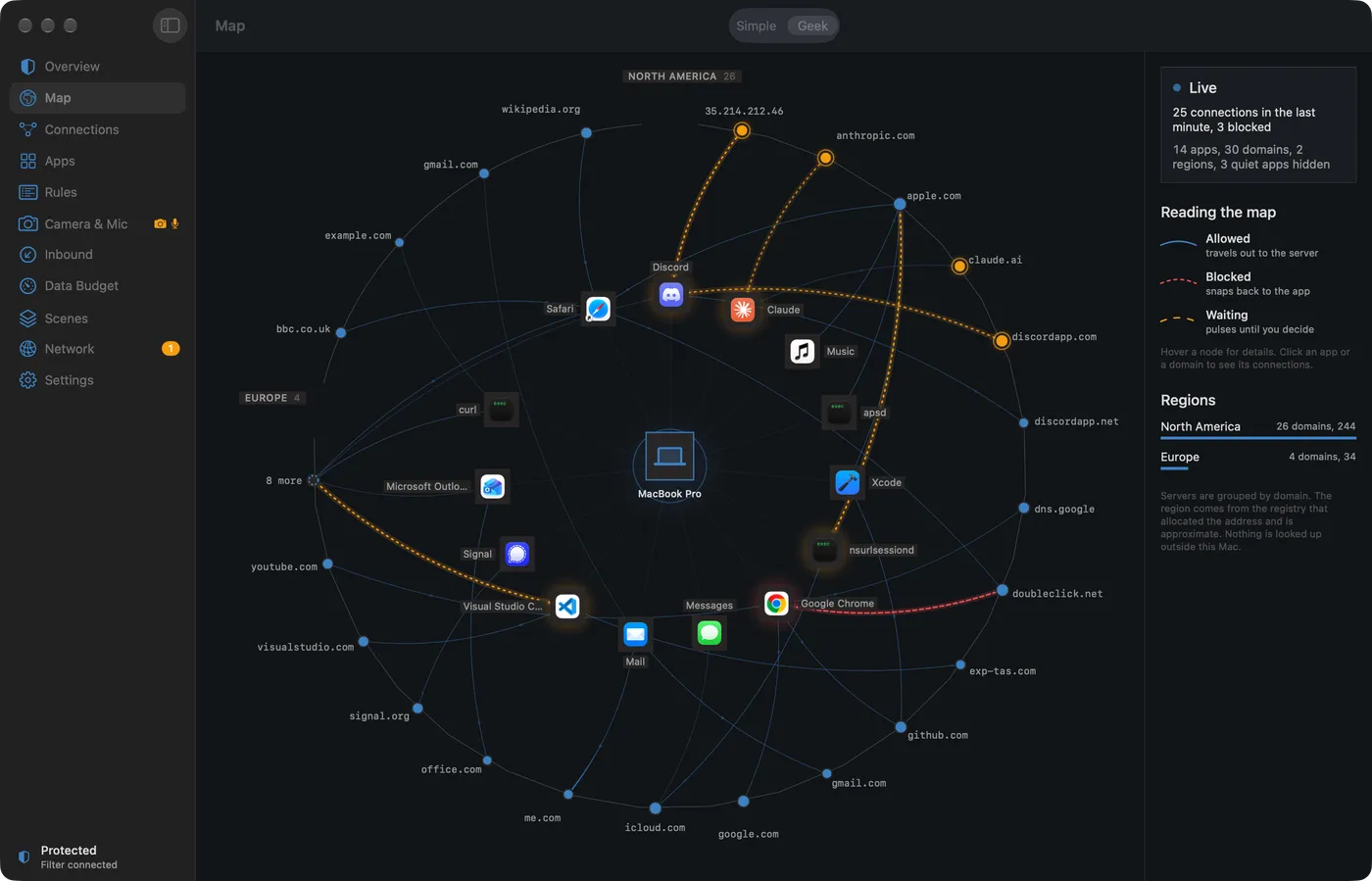
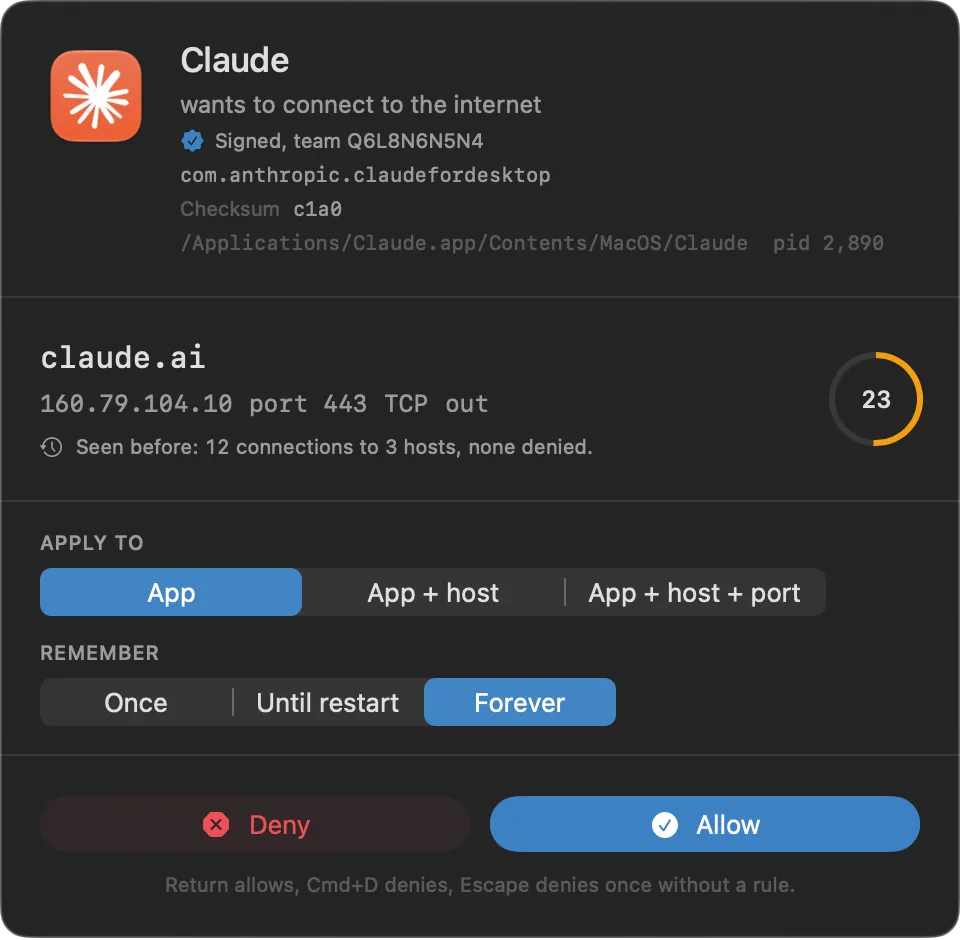
When an app reaches for a host it has not been allowed to reach, NetWard holds the connection and asks. You see who is asking: the app, its signature and team, the binary, the process that launched it. You see where it is going and what it did before. Then you decide, and the rule is written for you.
Return allows. Cmd D denies. Esc denies once without writing a rule.
Connections arrive in the table as they happen. Select one and the inspector shows the signing identity, path, checksum, remote address and the rule that matched, with Allow and Block one click away.
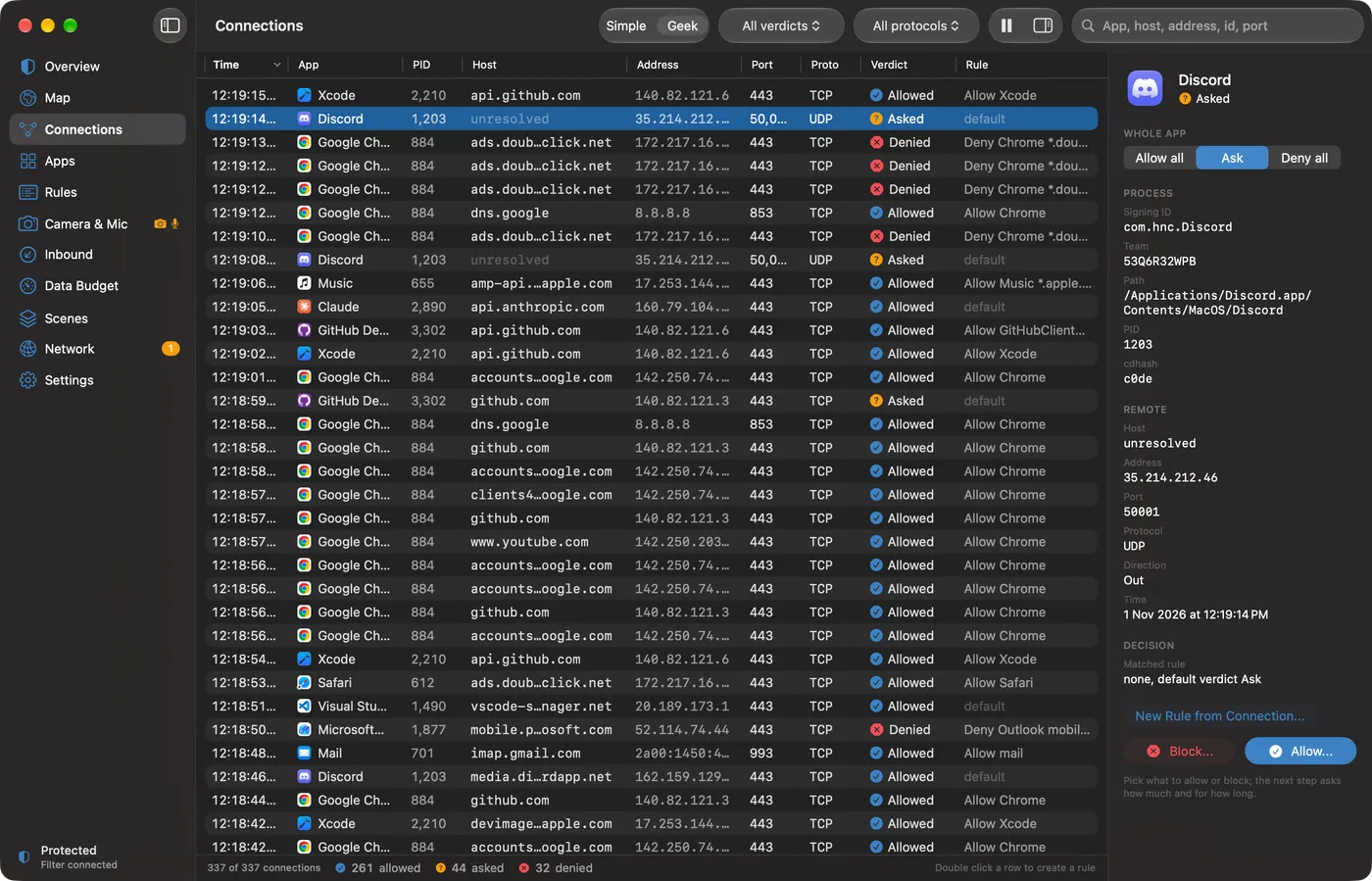
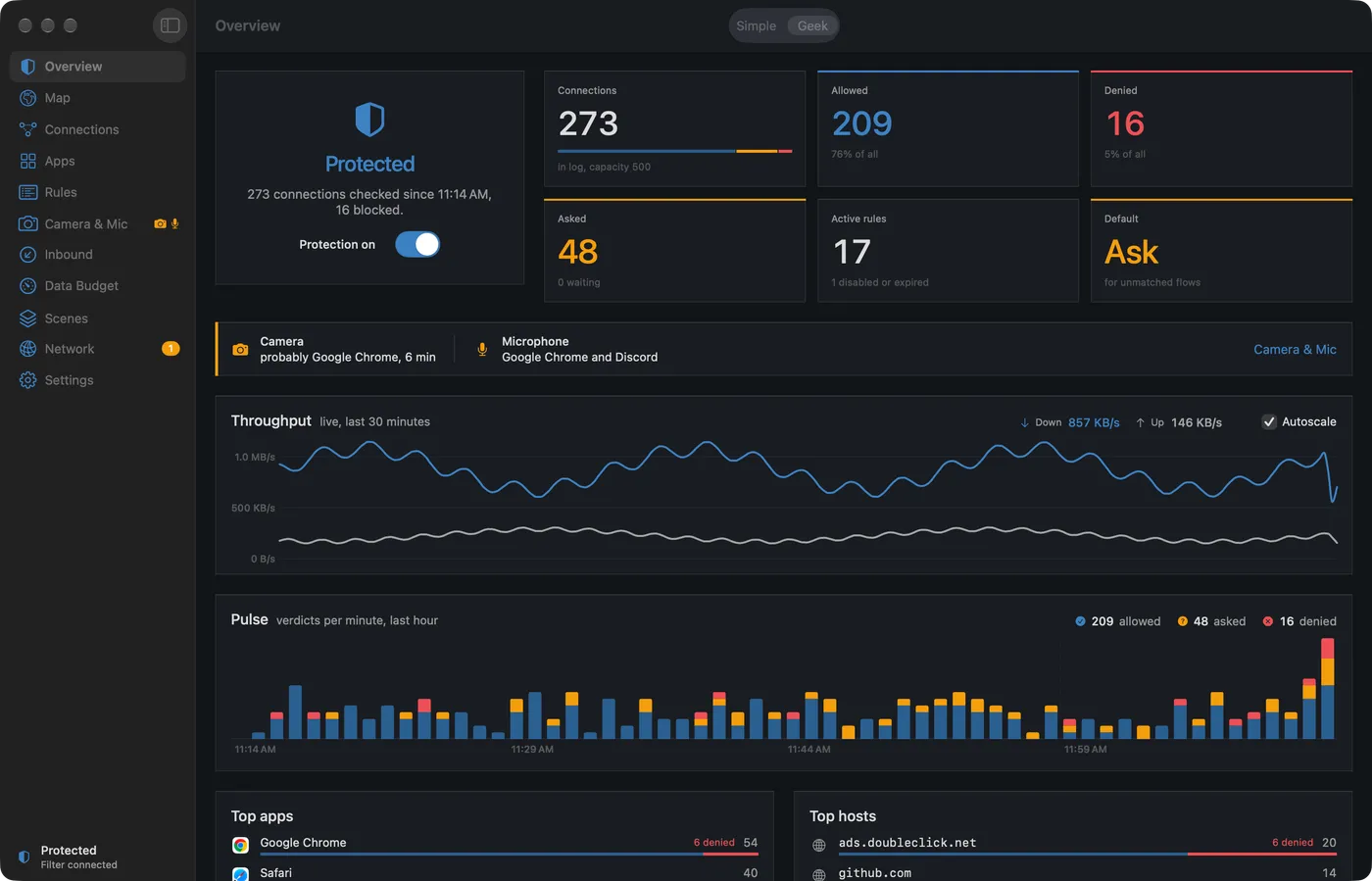
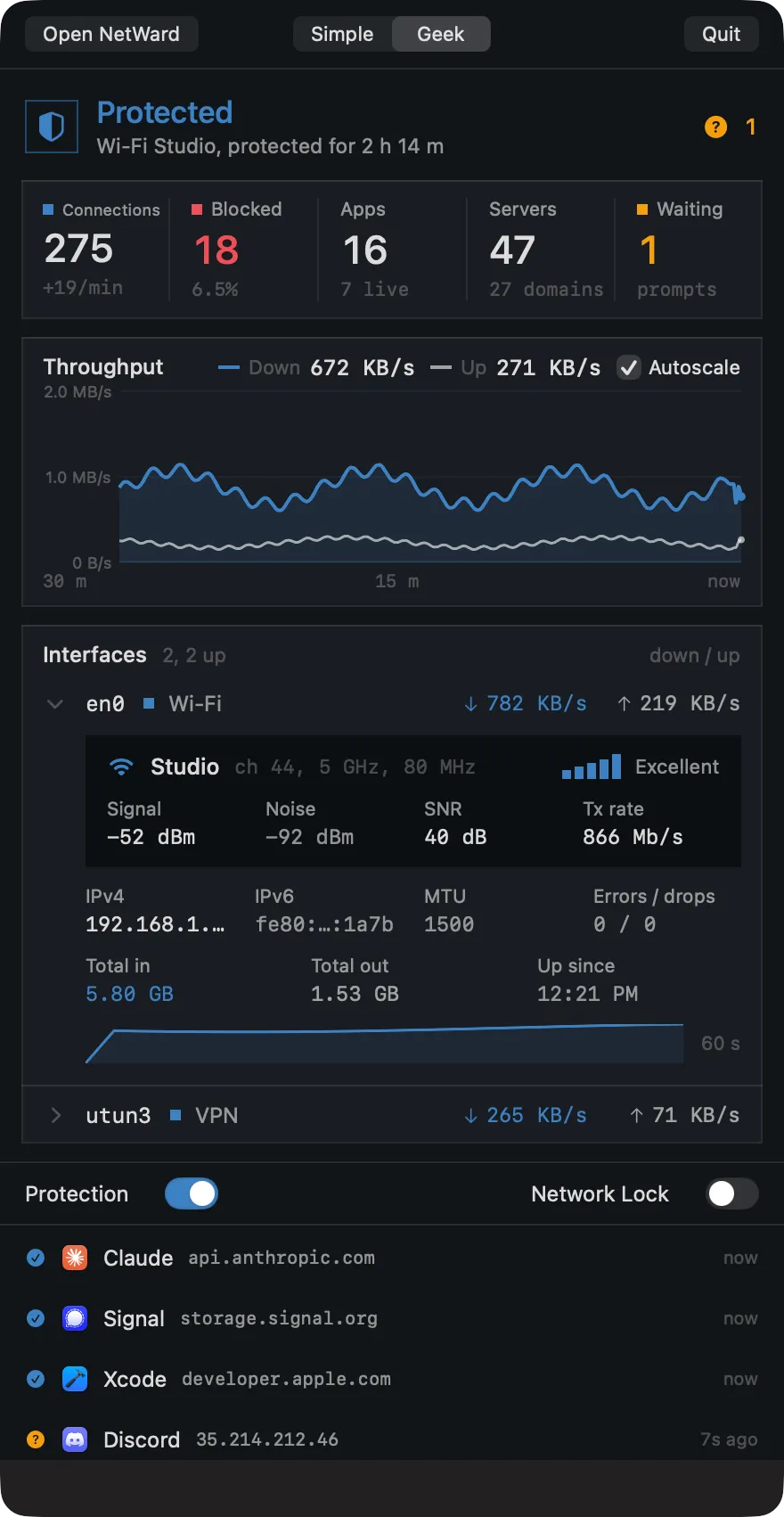
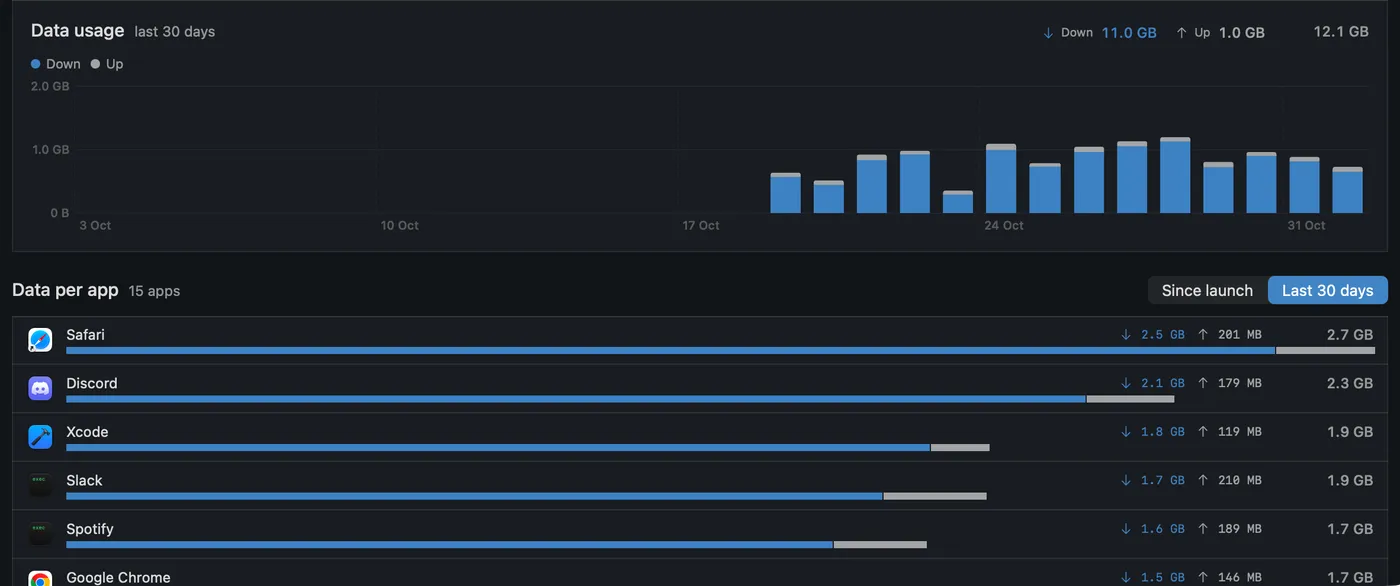
Simple mode keeps to plain language: whether you are protected, what was blocked, who asked. Geek mode opens the live table, the full rule editor with precedence, throughput, the inspector and data per app over 30 days. Switch at any time from the toolbar.
A desktop widget shows the same status and traffic without opening the app.
Modules ship inside NetWard and stay off until you switch them on. Each one shows its state in a single line, so you always know what is in force.
Tracker, telemetry, malware and P2P domains are stopped before they leave your Mac. Turn lists on or off, search them, add your own.
PersonalShows what is listening on your Mac and blocks connections coming in, per port, for 15 minutes, a few hours or for good.
PersonalWhen the tunnel drops, everything not going through it is blocked. A Mac that never had a tunnel up is never cut off.
PersonalOn a network you have not trusted, unknown connections ask first and unencrypted traffic is flagged.
PersonalMonthly budgets per app on metered networks, with an alert when an app runs over.
PersonalHome, Work, Travel and Lockdown. One switch changes your default verdict and modules together.
PersonalPuts netwardctl on your PATH: a top style view of every connection, with prompts answered from the keyboard.
Free to watchTells you when the camera or microphone switches on and which app most likely did it.
FreeAlso built in: encrypted DNS over HTTPS or TLS through a configuration profile, and Network Lock, which blocks everything no rule allows.
A top style monitor in split panes: bandwidth, processes, directions and verdicts, destinations and live connections. When something new asks, a decision window opens with the full detail and you answer from the keyboard.
netwardctlnetwardctl decidenetwardctl streamNetWard monitor ● connected ↓ 1.3 MB/s ↑ 91.5 KB/s 220 flows up 00:47:23 12:25:54 1 Dashboard 2 Connections 3 Processes 4 Destinations sort: traffic ┌─ Bandwidth ────────────────────────────────────────────┐┌─ Processes 9 by traffic ─────────────────────────────────────────────────────┐│ ↓ 1.3 MB/s peak 1.4 MB/s total 6.2 GB ││ PROCESS DOWN UP FLOWS DENY IN/OUT LAST DESTINATION ││ ▁▄▃▄▅▃ ▂▃▅ ││ Google Chrome 912 KB/s 41.0 KB/s 52 - 1/51 github.com:443 ││ ▁▄▅▇██▆▇▅▅▆▇███████▄▁ ▃▅███ ││ Safari 386 KB/s 18.5 KB/s 49 - 2/47 news.ycombinator. ││ ▃▇█████████████████████▅▃ ▁ ▂▃▂▂ ▁ ▁▁▄██████ ││ Discord 148 KB/s 22.0 KB/s 26 - 0/26 gateway.discord.g ││ ▃▃▂▂▅███████████████████████████▅▅▅▇██████████████████ ││ Xcode 96.0 KB/s 7.4 KB/s 20 - 1/19 developer.apple.c ││ ██████████████████████████████████████████████████████ ││ nsurlsessiond 54.0 KB/s 3.1 KB/s 22 - 0/22 gateway.icloud.co ││ ↑ 91.5 KB/s peak 199 KB/s total 412 MB ││ Mail 12.4 KB/s 9.8 KB/s 24 - 1/23 smtp.gmail.com:58 ││ ▄▇▃▆▆▇▂▁ ▂▁▆▂█▄▅▄ ││ Signal 6.8 KB/s 2.9 KB/s 10 - 1/9 chat.signal.org:4 ││ ▂▅▂▆▇████████▄▆▁ ▁ ▅████████▇▇█▁ ││ curl - - 10 - 0/10 httpbin.org:443 ││ █▄▁▁ ▄▁▃▄▄█████████████████▃▂▂▂ ▅▅████████████████▇█▂ ││ updater-helper - - 7 7 0/7 update.helper-cdn ││ ████▇█████████████████████████████████████████████████ ││ ││ ██████████████████████████████████████████████████████ ││ │└────────────────────────────────────────────────────────┘└────────────────────────────────────────────────────────────────────────────────┘┌─ Directions & verdicts ──────────────┐┌─ Destinations 12 ───────────────────────────────────────────────────────────────────────────────┐│ out 214 ███████████████████▌ ││ HOST FLOWS DENY SEEN PORTS APPS ││ in 6 ▌ ││ github.com 27 - 11s 443 Google Chrome ││ allow 210 ███████████████████▏ ││ gateway.discord.gg 26 - 22s 443,50001 Discord ││ deny 7 ▋ ││ accounts.google.com 25 - 1m 443 Google Chrome ││ ask 3 ▎ ││ smtp.gmail.com 24 - 8s 587 Mail ││ ││ gateway.icloud.com 22 - 30s 443 nsurlsessiond ││ TCP 215 UDP 5 other 0 ││ developer.apple.com 20 - 19s 443 Xcode │└──────────────────────────────────────┘└──────────────────────────────────────────────────────────────────────────────────────────────────┘┌─ Connections 220 live ─────────────────────────────────────────────────────────────────────────────────────────────────────────────────┐│ TIME VERD DIR PRO PROCESS DESTINATION LAUNCHED BY ││ 12:25:45 allow out TCP Mail smtp.gmail.com:587 launchd ││ 12:25:43 allow out TCP Google Chrome github.com:443 launchd ││ 12:25:40 allow out TCP Safari news.ycombinator.com:443 launchd ││ 12:25:37 allow out TCP Safari news.ycombinator.com:443 launchd ││ 12:25:34 allow out TCP Xcode developer.apple.com:443 launchd ││ 12:25:32 allow out TCP Discord gateway.discord.gg:443 launchd ││ 12:25:29 allow out TCP Safari www.wikipedia.org:443 launchd ││ 12:25:26 allow out TCP Google Chrome github.com:443 launchd ││ 12:25:24 allow out TCP nsurlsessiond gateway.icloud.com:443 launchd ││ 12:25:21 allow out TCP Google Chrome github.com:443 launchd ││ 12:25:18 deny out TCP updater-helper update.helper-cdn.xyz:80 launchd ││ 12:25:16 allow out TCP Safari www.wikipedia.org:443 launchd ││ 12:25:13 deny out TCP updater-helper update.helper-cdn.xyz:80 launchd │└──────────────────────────────────────────────────────────────────────────────────────────────────────────────────────────────────────────┘ ? help 1-4 view / filter i in/out s sort p pause ↑↓ scroll q quit
NetWard monitor ● connected 1 waiting ↓ 1.3 MB/s ↑ 91.5 KB/s 220 flows up 00:47:23 12:25:54 1 Dashboard 2 Connections 3 Processes 4 Destinations sort: traffic ┌─ Bandwidth ────────────────────────────────────────────┐┌─ Processes 9 by traffic ─────────────────────────────────────────────────────┐│ ↓ 1.3 MB/s peak 1.4 MB/s total 6.2 GB ││ PROCESS DOWN UP FLOWS DENY IN/OUT LAST DESTINATION ││ ▁▄▃▄▅▃ ▂▃▅ ││ Google Chrome 912 KB/s 41.0 KB/s 52 - 1/51 github.com:443 ││ ▁▄▅▇██▆▇▅▅▆▇███████▄▁ ▃▅███ ││ Safari 386 KB/s 18.5 KB/s 49 - 2/47 news.ycombinator. ││ ▃▇█████████████████████▅▃ ▁ ▂▃▂▂ ▁ ▁▁▄██████ ││ Discord 148 KB/s 22.0 KB/s 26 - 0/26 gateway.discord.g ││ ▃▃▂▂▅███████████████████████████▅▅▅▇██████████████████ ││ Xcode 96.0 KB/s 7.4 KB/s 20 - 1/19 developer.apple.c ││ ██████████████████████████████████████████████████████ ││ nsurlsessiond 54.0 KB/s 3.1 KB/s 22 - 0/22 gateway.icloud.co ││ ↑ 91.5 KB/s peak 199 KB/s total 412 MB ││ Mail 12.4 KB/s 9.8 KB/s 24 - 1/23 smtp.gmail.com:58 ││ ▄▇▃▆▆▇▂▁ ▂▁▆▂█▄▅▄ ││ Signal 6.8 KB/s 2.9 KB/s 10 - 1/9 chat.signal.org:4 ││ ▂▅▂▆▇████████▄▆▁┌ Decision needed 27s left ┐10 httpbin.org:443 ││ █▄▁▁ ▄▁▃▄▄████████████████│ │7 update.helper-cdn ││ ████▇█████████████████████│ nc wants to connect │ ││ ██████████████████████████│ │ │└───────────────────────────│ to relay.tunnel-cdn.net:4444 TCP (45.83.64.12) │───────────────────────────┘┌─ Directions & verdicts ───│ process /opt/homebrew/bin/nc pid 5233 │───────────────────────────┐│ out 214 █████████████│ signing UNSIGNED binary │ APPS ││ in 6 ▌ │ cdhash 9be1c07d5f22e0a4 │ Google Chrome ││ allow 210 █████████████│ launched by zsh pid 4410 │1 Discord ││ deny 7 ▋ │ │ Google Chrome ││ ask 3 ▎ │ │ Mail ││ │ │ nsurlsessiond ││ TCP 215 UDP 5 other 0 │ │ Xcode │└───────────────────────────│ │───────────────────────────┘┌─ Connections 220 live ──│ Rule for [h] this host [p] host + port [w] whole app │───────────────────────────┐│ TIME VERD DIR PRO │ Keep [o] once [r] until restart [f] forever │ LAUNCHED BY ││ 12:25:45 allow out TCP │ │ launchd ││ 12:25:43 allow out TCP │ a Allow d Deny Esc later │ launchd ││ 12:25:40 allow out TCP └──────────────────────────────────────────────────────────────────────────────────┘ launchd ││ 12:25:37 allow out TCP Safari news.ycombinator.com:443 launchd ││ 12:25:34 allow out TCP Xcode developer.apple.com:443 launchd ││ 12:25:32 allow out TCP Discord gateway.discord.gg:443 launchd ││ 12:25:29 allow out TCP Safari www.wikipedia.org:443 launchd ││ 12:25:26 allow out TCP Google Chrome github.com:443 launchd ││ 12:25:24 allow out TCP nsurlsessiond gateway.icloud.com:443 launchd ││ 12:25:21 allow out TCP Google Chrome github.com:443 launchd ││ 12:25:18 deny out TCP updater-helper update.helper-cdn.xyz:80 launchd ││ 12:25:16 allow out TCP Safari www.wikipedia.org:443 launchd ││ 12:25:13 deny out TCP updater-helper update.helper-cdn.xyz:80 launchd │└──────────────────────────────────────────────────────────────────────────────────────────────────────────────────────────────────────────┘ a allow d deny h/p/w scope o/r/f duration Tab next Esc later ? help
Rendered from netwardctl's own drawing code at 140 by 42 with demo data. The terminal and the app talk to the same filter.
If NetWard's own filter hits an error, connections go through. A bug of ours never takes your network down.
A Network Extension system extension, signed with Developer ID, notarized by Apple, approved once by you.
No analytics and no usage reports. Your connection history, rules and statistics stay on your Mac.
Apps are identified by their code signature and team, not their file name, so a binary that borrows a name does not inherit its rules.
Regions on the map are worked out on your Mac. Nothing about your connections is sent to a lookup service.
Pre-approved system extension and content filter, managed settings and one license key for a team.
Watching is free. Deciding is what you pay for.
Monitor
0EUR
Free for as long as you use it.
One Mac
49EUR
One time. 12 months of updates included.
Companies, from a single seat
from59EUR
Per seat, per year.
| Seats | Per seat, yearly |
|---|---|
| 1 to 2 seats | 89 EUR |
| 3 to 10 seats | 69 EUR |
| 11 seats or more | 59 EUR |
Every plan starts with a 14 day trial of everything. Geek mode and the Blocklist are part of Personal and Team. Prices in EUR.
Something missing? Write to hello@realsec.dev.
NetWard launches in January 2027 and is in final testing now. You can pre-order now, or leave your email in the shop to hear when it ships.
Any Mac with macOS 15 Sequoia or later. NetWard installs a Network Extension that you approve once in System Settings.
The filter fails open on its own errors: if something inside NetWard goes wrong, your connections keep working. Your network never breaks because of us.
Free is a monitor. You see every connection, the map, traffic and data per app, the camera and mic monitor, the widget and the netwardctl view. Rules, prompts, Geek mode, the Blocklist and the other modules come with Personal and Team.
NetWard keeps working on that Mac, with your rules, for as long as you use it. If you want the versions released after your 12 months, you can renew updates.
No. Connection logs, rules and statistics stay on your Mac, and region lookups on the map are done locally. NetWard goes online to check for updates, to download the blocklists you turn on and to activate your license.
Yes, with Team. The system extension and content filter can be pre-approved through your MDM, settings can be managed centrally and one company license key covers all seats. Team works for a single seat too.
NetWard can install a configuration profile that sends DNS over HTTPS or over TLS to the resolver you choose. Removing the profile in System Settings turns it off.
Launching January 2027. Final testing now.